


AT&T Visual Voicemail
3.37.49K Reviews
App Specs
- Version
- 4.21.0.10247
- Updated On
- License
- Free
- Downloads
- 10,000,000+
- Developer
- AT&T Services, Inc.
- Categories
- Communication
- Platform
- Android, iOS
Screenshots

 Analysis by AppCompare
Managing voicemail is one of those phone tasks I usually want to finish without thinking about it. That is where AT&T Visual Voicemail makes sense: it puts voicemail messages into an inbox-style view instead of forcing me to call a mailbox and move through spoken prompts. I tested it as a focused communication app, and my impression is straightforward: it is useful when your AT&T phone service supports it properly, but it is not a universal voicemail replacement for every phone user.
The app is free, aimed at everyone, and developed by AT&T Services, Inc. It has been available since October 13, 2011, and its current version is 4.21.0.10247. That long history matters because this is not an experimental messaging tool; it is a carrier-specific utility that has stayed focused on one job. The app has passed 10 million installs, with an average rating of 3.3 from roughly 22 thousand ratings and about 7.5 thousand written reviews. Those figures suggest a familiar pattern: many people appreciate the convenience when activation and carrier support line up, while others encounter setup or compatibility frustrations.
How the current voicemail experience feels
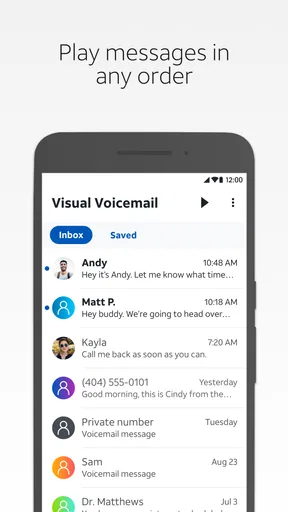
The main benefit is the visual inbox. Instead of dialing voicemail, listening to every message in sequence, and remembering which keypad option saves or deletes it, I can look at a list and decide what deserves attention. That small change makes voicemail feel closer to email or text messages. A missed call with no urgent message can be handled quickly, while an important message can be revisited without navigating an audio menu again.
This is particularly handy when I am in a place where listening to a voicemail aloud would be awkward. I can see which messages are waiting, choose one when I have privacy, and keep the rest untouched. The visual approach also gives me a clearer sense of whether I have already reviewed something. For people who receive appointment calls, delivery calls, family messages, or work-related voicemails, that overview is more practical than a traditional mailbox.
There is an important qualification, though: this is not simply a general voicemail app that works independently of the mobile network. Its value depends on the relationship between the application, the phone, and AT&T voicemail service. If you use another carrier, or if your line is not provisioned for the relevant service, installing the app alone will not turn it into a complete voicemail system. I would check carrier compatibility before treating it as a solution.
The app is best understood as a front end for voicemail rather than a replacement for the phone’s entire calling system. It does not try to become a full chat platform, a call recorder, or a unified communications hub. That narrow focus is a strength for someone who wants less clutter, but it also explains why users expecting a broad set of communication tools may find it limited.
A realistic day-to-day example
Imagine missing a call while commuting. Later, rather than dialing into voicemail while walking or waiting in line, I open the visual inbox and identify the message from a local business. I can listen when convenient, leave a less important message for later, and avoid replaying several older messages just to reach the newest one. If I need to return the call, I can use the information in the message and then move on.
Worth Reading Before You Choose

EA SPORTS FC Mobile 26 Is a Bigger Football Game, but It Takes Time

Flipboard Shows What News Apps Must Do Beyond the Feed

Switching to Android Auto Means Rethinking Your Driving Routine

Google Calendar Makes a Crowded Week Easier to Manage

Ludo King Makes the Most of the Minutes Between Plans

Baby Panda World Brings Quick Play to Modern Phones, but Its Game Library Feels Busy
That workflow is not dramatic, but it is exactly why visual voicemail exists. The time savings come from reducing small points of friction: no memorizing keypad commands, no waiting through messages I already handled, and no guessing whether a notification refers to a new message or an old one. For a person who receives voicemail regularly, those details add up.
What the app does well for existing AT&T customers
My favorite aspect is the separation between message awareness and message playback. A conventional voicemail call makes those two actions inseparable: you dial in, listen through the mailbox, and manage messages during the same session. A visual interface lets me first scan what is there and then choose the order in which I deal with it.
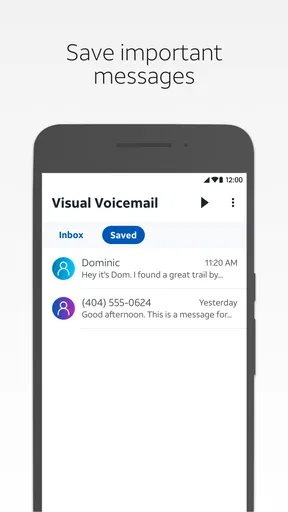
That is also useful for people who need to preserve a message temporarily. If someone leaves directions, a reference number, or a detail I need to write down, I can return to the same message rather than relying on memory. I would still keep a separate note for anything important, because voicemail should not be treated as a permanent document archive, but the visual list makes short-term reference easier.
Another practical advantage is reducing accidental deletion. In an audio mailbox, it is easy to press the wrong key or lose track of the menu. A visual list gives me more time to confirm what I am handling. That does not eliminate user error, but it makes the decision more deliberate, especially when several messages arrive close together.
The real value is not extra communication features; it is control over the order and timing of voicemail tasks. That distinction helps set expectations. If you want a polished way to review carrier voicemail, this app has a clear purpose. If you want transcription, collaborative inboxes, or a single screen combining several messaging services, you may prefer a different tool or the features built into your phone.
How the product has evolved
The release history gives the app a long-running place in AT&T’s communication lineup, while version 4.21.0.10247 represents its current state. I see that evolution less as a reinvention and more as continued maintenance of a carrier utility. The core idea remains stable: make voicemail easier to inspect and manage than a phone call into an automated mailbox.
That stability can be reassuring for existing users. A voicemail tool does not need a new social feed or a collection of distracting extras. Keeping the experience centered on messages makes sense. At the same time, a mature app has to keep pace with current phones, operating-system behavior, notifications, and account activation. The minimum operating-system requirement is Android 10, so anyone using an older Android device should check compatibility before planning around it.
The version information is useful for current customers who are troubleshooting. If the application is already installed, checking whether it is running the current version is a sensible first step before assuming the service itself is unavailable. Updates can matter even when the visible interface changes very little, because carrier applications must continue communicating correctly with the phone and network.
I would separate that verified current state from expectations about future releases. There is no reason to assume that a later update will add a particular feature, redesign the inbox, or improve every carrier-related problem. The sensible approach is to judge the app by what it does now: visual voicemail management for an eligible AT&T line, not by hoped-for additions.
What changes mean for people who already use it
For an existing user, the biggest question is usually not whether visual voicemail is a good idea. It is whether the current app continues to fit into a familiar routine. If the inbox opens normally, new messages appear promptly, and playback works, an update should be evaluated mainly on reliability rather than novelty. I would avoid changing several phone or voicemail settings at once, because that makes it harder to identify the source of a problem.
A useful habit is to keep the phone’s basic voicemail access available even when the visual interface is working. If the app temporarily fails to display a message, calling voicemail through the normal phone interface can provide a fallback. This does not make the app unnecessary; it simply prevents one application from becoming the only path to an important message.
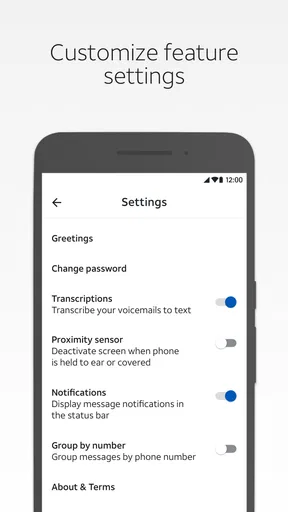
Notifications deserve practical attention. A visual inbox is most helpful when I know a message has arrived, but I would not assume that every notification issue is caused by the app itself. Phone-level notification settings, battery restrictions, network conditions, and account provisioning can all affect the experience. Checking those basics before reinstalling is less disruptive and may preserve the local state of the app.
When moving to a new phone, I would treat voicemail access as something to verify early rather than after an urgent call is missed. Confirm that the app is compatible with the device, sign in or activate it as required by the service, and leave a test message from another phone. That simple test answers more than an installation screen does: it shows whether the line, device, and application are working together.
There is also a privacy consideration in everyday use. A voicemail inbox can contain personal information, so I would use the phone’s own security protections and avoid playing messages through a speaker in public. The app’s visual layout makes it easier to choose a message discreetly, but discretion still depends on how and where the phone is used.
Where it still falls short
The carrier dependency is the largest limitation. A person who changes carriers, uses multiple lines, or wants one voicemail experience across different providers may find this app too narrow. The usual phone dialer can be more universal because it relies on the carrier’s standard voicemail access, while third-party voicemail services may offer broader account management. In exchange, those alternatives can involve separate accounts, different workflows, or additional complexity.
The average rating of 3.3 shows that the experience is not equally smooth for everyone. I would not read that number as proof that the app is poor, because carrier utilities often receive complaints when activation, device compatibility, or network behavior gets in the way. Still, it is a useful warning not to assume that installing the application guarantees an immediate, trouble-free setup.
Another weakness is the limited scope of the product. Visual organization improves voicemail, but it does not automatically solve the larger problem of unknown callers, spam calls, follow-up reminders, or keeping a long-term record of conversations. If your goal is a complete call-management system, you will likely need tools outside this app. For a simple voicemail inbox, that restraint is acceptable; for broader communication management, it becomes a gap.
I would also avoid choosing it solely because it is free. The price is certainly attractive, but the more important question is whether your AT&T service and phone support the experience you want. A free app that cannot serve your line is less useful than the standard voicemail option already available through the phone. In other words, the cost is not the deciding factor; compatibility and reliability are.
Who should use it and who should skip it
I would recommend it to an AT&T customer who checks voicemail often and dislikes navigating an audio mailbox. It is especially suitable for people who receive several messages in a day, need to revisit messages, or want a quick visual reminder of what remains unheard. It can also help less confident phone users because seeing a list is easier than remembering a sequence of spoken commands.
I would be more cautious for someone who rarely receives voicemail. If most callers text, email, or leave no message, the app may not change much. The regular phone voicemail route may be sufficient, and adding a dedicated app may not justify another icon and another point of troubleshooting.
I would also skip it as a primary choice if you regularly switch between carriers or manage work and personal numbers from different providers. A carrier-neutral solution may be more convenient in that situation. Likewise, people who specifically need transcription, advanced search, cloud-style archiving, or a unified inbox should compare other options rather than expecting this focused app to grow into something else.
What I would watch before relying on it
For new users, I would watch three things during the first few days: whether new messages appear consistently, whether playback starts without unusual delays, and whether the notification behavior matches your routine. A visual voicemail app earns its place when it reduces uncertainty. If I still need to dial in repeatedly to confirm that messages arrived, the central benefit has been weakened.
I would also pay attention after changing devices, updating the operating system, or modifying the mobile plan. Those are the moments when a carrier-linked application can behave differently even though the interface looks familiar. Testing with a nonessential voicemail is safer than discovering a problem when an important caller is waiting.
For existing users, the current version is a reason to keep the app updated, but not a reason to expect a completely different product. I would judge future changes by whether they improve dependable access, clear message status, and straightforward management. New visual flourishes would matter less to me than consistent delivery and playback.
My final take on the app
AT&T Visual Voicemail succeeds because it addresses a very specific annoyance: traditional voicemail makes message management feel like a phone menu, while a visual inbox makes it feel like a list. In my experience, that is a meaningful improvement for regular AT&T voicemail users, particularly when they need to choose which messages to hear and when.
It is not the right answer for everyone. Carrier dependence, the Android 10 minimum requirement, uneven user experiences, and the narrow feature set all deserve consideration. I would not install it blindly on a non-AT&T line or choose it when my main need is transcription or a cross-carrier inbox.
For an eligible customer who wants a free, focused way to keep track of calls, though, I think it is worth trying. Set it up before you need it, test it with a harmless message, keep standard voicemail access as a fallback, and judge it by the reliability of your own line. If that basic workflow works well, the app quietly removes a surprisingly irritating part of everyday phone use.
Pros
- Messages can be reviewed in any order without dialing voicemail.
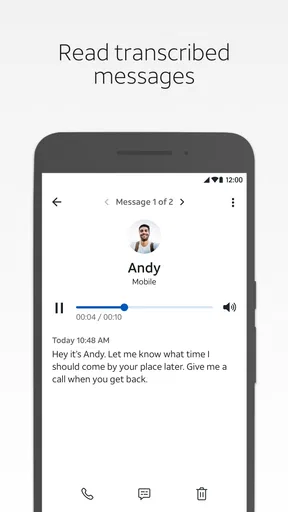
- Transcriptions make it easier to scan messages in noisy environments.
- The interface is simple and familiar for most AT&T subscribers.
- You can quickly return calls directly from the voicemail list.
- Voicemail details remain organized by caller
- date
- and message status.
Cons
- Availability depends on an eligible AT&T plan and supported device.
- Transcription accuracy can vary with accents
- noise
- or poor audio quality.
- Some features may not work while traveling or outside AT&T coverage.
- Deleted messages may be difficult or impossible to recover after removal.
- The app offers limited value if you rarely receive voicemail messages.
FAQs for AT&T Visual Voicemail
What is AT&T Visual Voicemail, and how does it work?
AT&T Visual Voicemail lets eligible AT&T wireless customers manage voicemail through a visual inbox instead of calling a voicemail number. After opening the app or voicemail section, you can see messages listed by caller and date, play them in any order, pause or replay recordings, delete unwanted messages, and sometimes save or share them. Availability depends on your device, plan, and AT&T account configuration.
Is AT&T Visual Voicemail free to download and use?
The Visual Voicemail application may be available at no additional app cost, but voicemail service itself is connected to your AT&T wireless plan. Standard mobile data charges could apply when messages are accessed over cellular data, while Wi-Fi usage generally avoids cellular data consumption. Some advanced voicemail features or compatible plans may have separate requirements, so checking your current AT&T account is recommended before relying on the service.
Which phones and AT&T plans support Visual Voicemail?
Support varies according to the phone model, operating system, AT&T network compatibility, and wireless plan. Many modern Android phones and iPhones include visual voicemail functionality, although the exact setup can differ between devices. Prepaid, business, international, or older accounts may have different eligibility rules. If the feature does not appear after installation, confirm that voicemail is active and that your device is provisioned by AT&T.
Does AT&T Visual Voicemail require mobile data or an internet connection?
Visual Voicemail normally needs a network connection to synchronize your voicemail inbox and retrieve message details. It may use Wi-Fi or mobile data, depending on how your phone is connected. If service is unavailable, you might not see newly received messages immediately, even though callers can still leave voicemail. You can usually access basic voicemail by dialing the voicemail number when visual synchronization is temporarily unavailable.
What should I do if AT&T Visual Voicemail is not working?
If messages are missing or the app will not load, first verify that your phone has a reliable connection and that voicemail calling works normally. Restarting the device, updating the app and operating system, and checking voicemail permissions can resolve common problems. You may also need to reset the voicemail password or refresh the mailbox. If the issue continues, contact AT&T support to verify account provisioning and service compatibility.


